Historical source and event dates are not site publication dates. Product plans, policies and availability may have changed since retrieval.
The setup
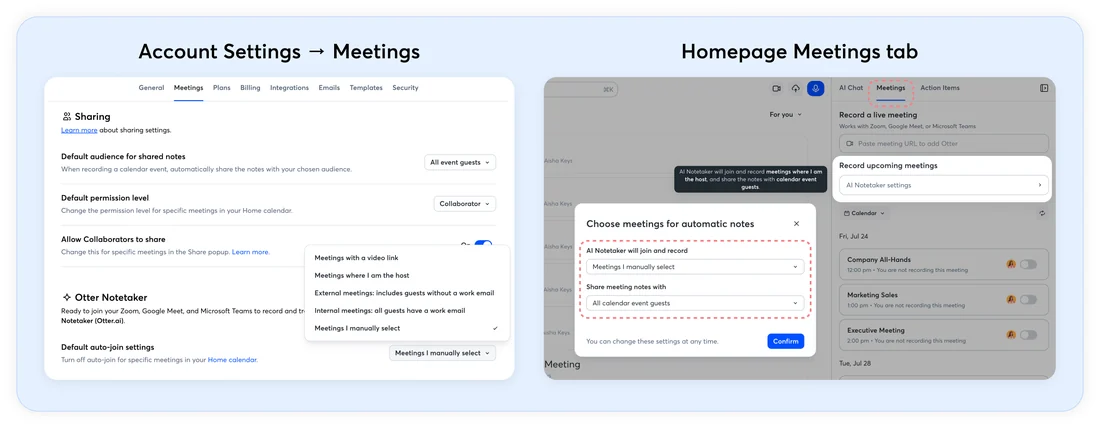
Otter's meeting product works by connecting a calendar — Google, Microsoft 365, or Zoom — so that an automated participant called Otter Notetaker can join a scheduled call, capture audio, and produce a transcript and summary afterward. Getting a company onto Otter for Business means enabling that connection at the individual level, then, for a paid Enterprise Workspace, an admin turning on workspace-wide settings that sit above what each person configures. Otter's own Notetaker settings documentation lists three groups of controls: auto-share, auto-join, and chat-message behavior. A separate Enterprise Admin Controls documentation describes what an admin can additionally require, including whether attendees are told a meeting will be recorded before the Notetaker joins.
What the documents show
At the individual level, the settings page describes a toggle called Send pre-recording emails, which, when turned on, sends an email to every calendar guest five to ten minutes before the meeting warning that Otter will join and record. It is off unless a user sets it. The same page describes an in-meeting chat message that, once enabled, posts a link to the live transcript when Notetaker joins. The admin documentation adds a workspace-wide version, Enforce pre-meeting recording notifications, which an Enterprise admin can turn on to override every individual's own preference and lock it so users cannot change it back. Otter's own documentation frames this as a compliance feature, not a legal opinion: it tells admins to ensure your organization's recording practices comply with applicable laws and regulations before switching it on, naming the customer as responsible for that judgment.
The friction
Every notice mechanism described is optional and off by default at the individual level. A company wanting a guarantee attendees are always told has to reach for the Enterprise-tier enforce setting, and even then retention is not self-serve: the admin documentation says a custom retention policy is managed by Otter and requires contacting an account manager. A separate control, Require permission confirmation, is its own toggle for the in-app Record button, distinct from the Notetaker's notice settings, so a workspace can end up with notices set for one recording method and not the other.
What changed in the work
Before this kind of tool, joining a call meant nobody was recording unless a person visibly pressed record. After it, an automated participant can join, capture, and summarize a meeting without anyone doing anything, and the visible cue that recording is happening — the notice email or chat message — is a setting someone already had to choose to turn on. That is an editorial read of the setup cost: the friction sits in transparency being opt-in behavior layered on a default that already lets the bot join quietly.
- Is the pre-meeting notice email turned on for this workspace, and who can change that?
- Does the admin-enforced version override what individual hosts already set for themselves?
- Who has to be contacted to set a specific data-retention window for recordings?
None of this tells a reader whether a given meeting was properly disclosed to its participants; it only describes what Otter's own pages say is configurable, and by whom.
Sources & verification
Preserved from the earlier archive. These sources have not all been freshly rechecked for this expansion.
- Manage your Otter Notetaker settingsSource date: not stated · Retrieved: 2026-09-16
Describes individual-level Notetaker settings: auto-share, auto-join, and the pre-recording email and in-meeting chat message toggles.
- Enterprise Admin Controls OverviewSource date: not stated · Retrieved: 2026-09-16
Describes workspace-wide admin controls including enforced pre-meeting notifications, custom data retention, and manual-recording permission confirmation.
Continue the workflow
- Review a shared-inbox draft without colliding or sending early
A small-team shared-inbox routine that prevents duplicate replies, context leakage, approval confusion, and accidental sends.
- Reconcile meeting actions across a recurring series
A method for resolving duplicate, changed, and conflicting action items across recurring meeting notes, transcripts, and task systems.
- Write an asynchronous status update from source records
A compact status-update format for freelancers and small teams that readers can verify without scheduling another meeting.
- Fireflies follows each meeting platform's own consent rule
Fireflies' own compliance guide shows recording consent differs by video platform, with separate notices a host must enable.