Documentation-based proposal; not a hands-on test
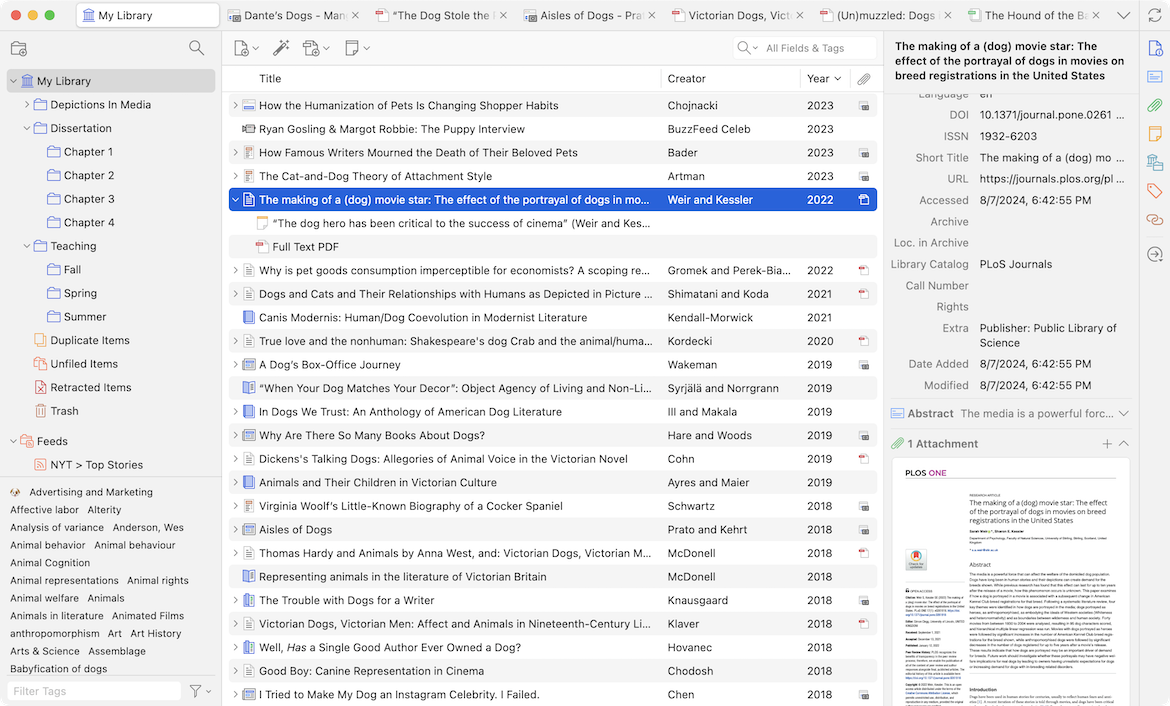
Choose collaboration, transfer, or snapshot
“Send the Zotero library” can mean three different jobs. Ongoing collaboration calls for a group library. Moving one person’s complete working library to another computer calls for sync or a data-directory transfer. A bounded project handoff may call for an export plus a human-readable manifest. Pick the job first because the formats do not preserve the same things.
Zotero’s export guidance says Zotero RDF with files and notes is the most complete export for another Zotero user, but also warns that export is not a proper backup or a replacement for collaboration. Reimport can change dates, break links to existing word-processor citations, and lose fields depending on format. That makes an export a snapshot, not an invisible continuation of the sender’s library.
Resolve attachment behavior before packaging
Open the collection and inspect attachment types. Zotero’s file documentation distinguishes stored files, which Zotero manages and can sync, from linked files, which point to a path on one computer. Linked files are not synced and cannot be used in group libraries. A metadata export can therefore look complete while the receiver gets broken attachment links.
For each item used in the project, require a parent bibliographic record and label the attachment state: stored and present, linked and converted, web-only, intentionally omitted, or unavailable. Avoid a pile of standalone PDFs with no title, author, or publication metadata. If permissions prevent sharing a file, retain the citation and add a note explaining how an authorized teammate can retrieve it; do not smuggle the attachment into the package.
Make a small manifest for humans
The receiver should not need to reverse-engineer collection names. Include a short README beside the export with the question the library served, inclusion boundary, last review date, key tags, and known gaps. Add a table that can be read without Zotero.
| Manifest field | Example content |
|---|---|
| Collection purpose | Sources used for the September workflow guide |
| Included | Primary documentation and methods references |
| Excluded | Unverified vendor roundups and duplicate snapshots |
| Status tags | read, used, contradictory, needs-access |
| Attachment exceptions | Two licensed files omitted; retrieval notes remain |
Keep status tags few and defined. Zotero collections behave more like playlists than folders, and items can appear in multiple collections. That flexibility is useful to the sender but can make a copied hierarchy misleading. If a tag drives workflow, explain it in the README. The related evidence-table guide can hold the claim-level decisions that a citation manager is not designed to express.
Test the handoff from the receiver’s side
Use a fresh profile, separate account, or teammate’s device. Ask the receiver to locate one key source, open its attachment, identify why it was included, and generate one citation in the target style. For an ongoing team library, verify the receiver’s role in the group settings. Zotero’s group documentation separates library reading, library editing, and file editing permissions; grant only what the work requires.
A hypothetical handoff might include 42 records, but the count proves little. The meaningful acceptance check is that the teammate can answer: What is in scope? Which files are missing? Which sources were actually used? Where are unresolved disagreements recorded? No invented completeness percentage is needed.
- State whether this is collaboration, full transfer, or a frozen snapshot.
- Convert or explain linked attachments before sharing.
- Export the bounded collection with notes and files where permitted.
- Add a plain-language manifest and tag legend.
- Have the receiver retrieve, open, understand, and cite a sample item.
For long-term portability, compare this process with the archive’s cross-app search record: search can locate material, but a durable handoff still needs explicit ownership and understandable structure.
Before you hand it over
Use this as a working check, not certification. Checks stay in this page only and reset on reload.
0 of 5 checked
Sources & verification
Product details are based on the linked documentation. The proposed workflow and worked examples are editorial guidance, not measured test results.
- How do I export my Zotero library?Source date: not stated · Retrieved: 2026-09-19T12:39:20.1443518-07:00
Export steps, Zotero RDF with files and notes, and limitations of export as backup, transfer, or ongoing collaboration.
- Adding Files to your Zotero LibrarySource date: not stated · Retrieved: 2026-09-19T12:39:20.1443518-07:00
Differences between stored and linked attachments, sync behavior, parent items, and group-library limits.
- Zotero GroupsSource date: not stated · Retrieved: 2026-09-19T12:39:20.1443518-07:00
Group-library types and separate permissions for reading, editing library records, and editing files.
Continue the workflow
- Turn a research question into an evidence table that survives disagreement
A reproducible way for a solo operator or small team to collect evidence, compare conflicting sources, and hand the work to another reader without losing provenance.
- Check PDF extraction before you trust the summary
A quick, repeatable quality check for deciding whether PDF text, tables, and OCR output are reliable enough to feed into notes or summaries.
- Dropbox bet Dash's cross-app search on data staying self-hosted
Dropbox's own 2024 launch post says Dash for Business searches connected apps while keeping AI processing inside Dropbox's own infrastructure.
- Audit knowledge-base access with allowed and denied tests
A minimum-rights test for a small team that checks both useful access and denied access across a shared knowledge base.