Historical source and event dates are not site publication dates. Product plans, policies and availability may have changed since retrieval.
The setup
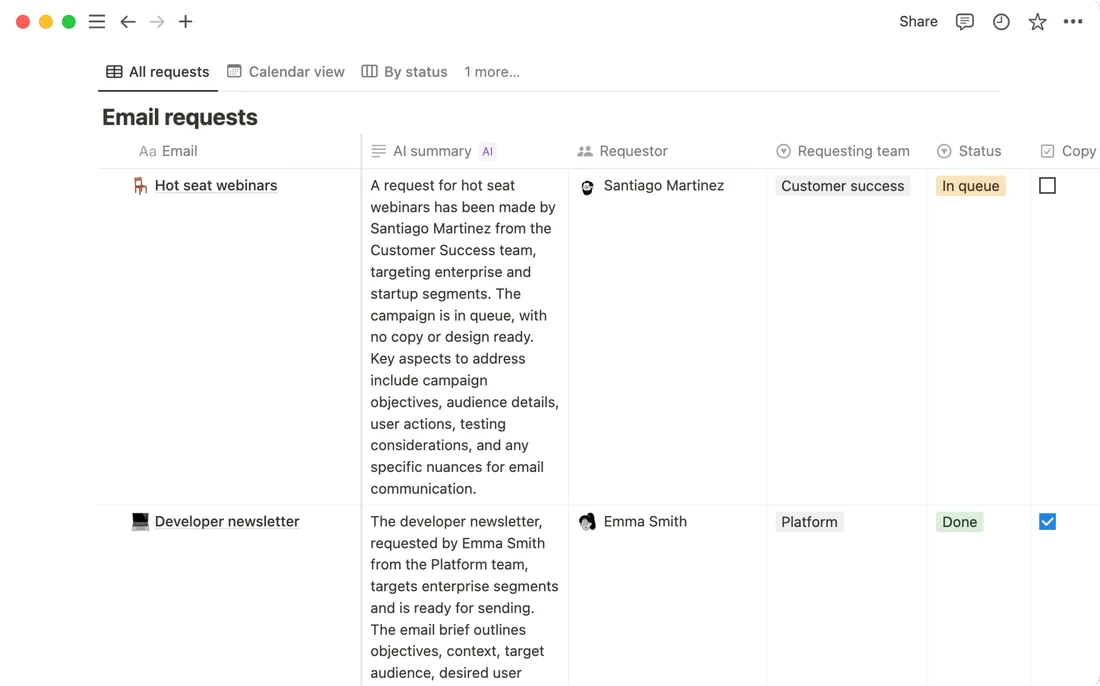
Autofill lets a Notion user generate a value for every row of a database property from a single configured prompt, rather than writing each row's summary or tag by hand. Notion's own help documentation, current as of 16 September 2026, describes two tiers: "Basic Autofill" for tasks like summarizing or tagging, and a more capable "Custom Agent Autofill" for multi-step instructions that can search other sources first. The page states "Basic Autofill is included in Business and Enterprise plans"; on other plans, running it "will use credits from your workspace, including any complimentary credits you may have available," converting what looks like a free feature into a metered one outside the top two tiers.
What the documents show
The setup steps the documentation lists are specific: hover the property header, choose "Set up AI Autofill," pick the autofill type, specify what should be generated, and "choose when it should run (for example, manually, on page create, or on page edits) and save." That last option matters because it turns a one-time backfill into a standing automation that runs every time a row is added or edited, a distinction the documentation states but does not default a new user toward one way or the other.
The friction
Notion's own documentation carries a direct accuracy warning: "We recommend that you always check the accuracy of content from Notion AI before relying on it for critical content." That sits uneasily next to the "on page edits" run trigger, since an automation configured to regenerate on every edit will keep producing new unchecked values unless someone deliberately reviews each run. The credit-metering detail is a second disclosed cost: a workspace below Business or Enterprise can enable Autofill only by spending down a shared credit pool, which is a plan-and-billing decision, not a one-time toggle.
What changed in the work
The manual task of filling in a summary or tag for every row became, per column, a one-time configuration decision about input, instructions, and run frequency, kept as an ongoing automation if a team accepts the review burden the documentation itself flags, or dropped back to a manual or one-off run if it does not. That kept-or-dropped framing follows directly from the documentation's own trigger options and warning, rather than adding a claim beyond them.
- Which run trigger does your team's Autofill column use, and who reviews its output?
- Is your workspace on a plan where Autofill draws from a shared credit pool?
- Would a one-time manual run serve the task better than an on-edit automation?
Notion's own AI product page and its help documentation, read together, treat Autofill as a configuration with real running costs and a stated accuracy caveat, not as a set-and-forget feature.
Sources & verification
Preserved from the earlier archive. These sources have not all been freshly rechecked for this expansion.
- AutofillSource date: not stated · Retrieved: 2026-09-16
Plan requirements, credit metering, per-column setup steps, run triggers, and the accuracy-review warning.
- Notion AISource date: not stated · Retrieved: 2026-09-16
Vendor product page confirming Autofill's plan placement and Notion's data-training opt-in claim.
Continue the workflow
- Build a reusable writing brief before polishing the prompt
A compact, reusable specification for commissioning consistent writing without relying on a clever one-off prompt.
- Review the diff for altered facts, not just improved prose
A practical review pass for comparing document versions and finding factual changes hidden inside editorial revisions.
- Hand off an accessible document with structure intact
A human-centered final check for document structure, descriptive links, image alternatives, and usable delivery across formats.
- Coda folded its AI column into the price of making a doc
Coda's product and help pages, read on 16 September 2026, describe the AI column as bundled into the plan, with a caution about trusting its output.