Historical source and event dates are not site publication dates. Product plans, policies and availability may have changed since retrieval.
The setup
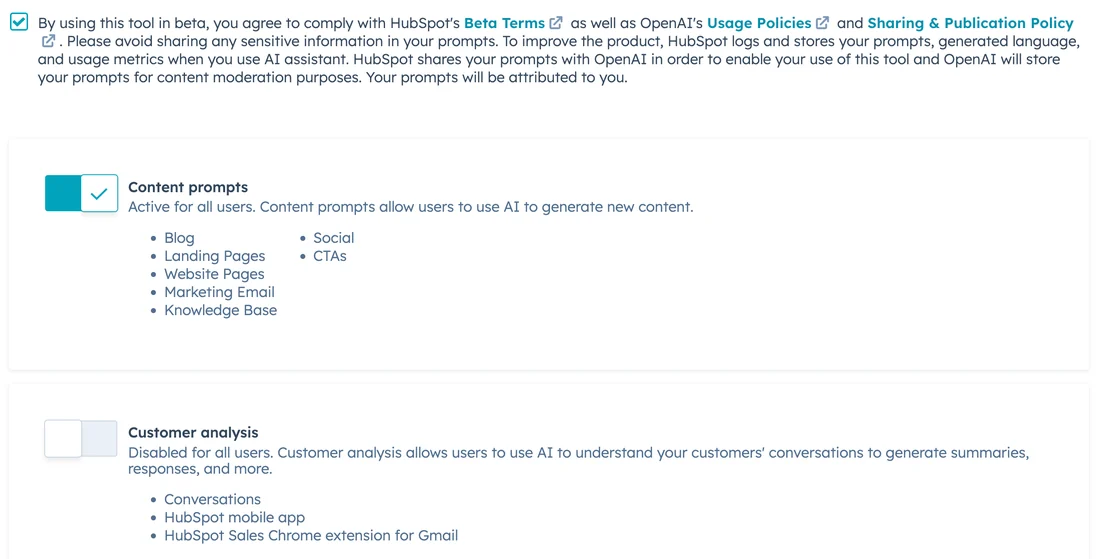
HubSpot built its AI email assistant into the tools a sales rep already uses to send outreach: the CRM's message templates and the HubSpot Sales add-in for Outlook. HubSpot's own knowledge-base article on generating sales email templates with AI assistant states an admin must first turn on generative AI access in the account's AI settings before anyone can use it, and a companion article on generating sales emails in the Office 365 add-in describes the same generator surfaced inside Outlook itself, reachable while composing a message rather than only inside the CRM.
What the documents show
Both articles describe the same input flow, and it is narrower than the premise that the assistant reads a contact's CRM record automatically: a rep chooses an email type such as introduction, cold outreach, or follow-up, then manually types a description of what they are selling, a description of who they are selling to, a summary of what the email should communicate, and a desired tone, before clicking Generate. Neither article describes the tool pulling those fields from an existing contact or deal record on its own; the audience and context are typed in by the rep for each generation.
The friction
Both articles carry the same review instruction, stated as a best practice rather than an enforced control: proofread and edit AI-generated content before using it, edit it to match the brand's voice, and balance AI content with human-written content, because the underlying model may occasionally produce incorrect, biased, or misleading output. The documentation also flags that results are less consistent in non-English languages and asks users to check that content more carefully, without describing any technical safeguard that blocks a rep from sending an unreviewed draft.
What changed in the work
The documented change is narrower than pulling a personalized message from CRM data: it is a faster way to get from a blank template to a full draft by describing the audience and goal in a form, rather than staring at an empty compose window. Reading this as automatic personalization from the contact record would overstate what HubSpot's own articles describe. The more accurate, editorial reading is that the rep still supplies the personalization manually, just through structured prompts instead of freeform typing.
- Is the rep re-typing context, like the prospect's industry or role, that already sits in the contact's CRM record?
- Has an admin actually reviewed the AI Trust FAQs and Model Cards the documentation points to before enabling account-wide access?
- What review step exists between a generated draft and a send, beyond the documentation's general proofreading advice?
HubSpot's own documentation is more modest than the feature's billing suggests: it describes a prompt-driven template generator, not a system that reads a contact's history and writes a personalized email unassisted. A team expecting the latter should reconcile that expectation with what the knowledge base actually walks through, step by step.
Sources & verification
Preserved from the earlier archive. These sources have not all been freshly rechecked for this expansion.
- Generate sales email templates with AI assistantSource date: not stated · Retrieved: 2026-09-16
HubSpot's own knowledge-base article describing the manual inputs the AI email template generator requires and the account setting that must be turned on first.
- Generate sales emails in the HubSpot Sales Office 365 add-in using AISource date: not stated · Retrieved: 2026-09-16
HubSpot's own knowledge-base article describing the same manual-prompt generator surfaced inside Outlook, and the review guidance given before sending.
Continue the workflow
- Review a shared-inbox draft without colliding or sending early
A small-team shared-inbox routine that prevents duplicate replies, context leakage, approval confusion, and accidental sends.
- Reconcile meeting actions across a recurring series
A method for resolving duplicate, changed, and conflicting action items across recurring meeting notes, transcripts, and task systems.
- Write an asynchronous status update from source records
A compact status-update format for freelancers and small teams that readers can verify without scheduling another meeting.
- Missive's AI assistant reads a thread's internal comments too
Missive's own docs show the assistant sees internal chat and notes in a thread, billed through an org-level provider a rep does not pick.